
First, a word about who is writing
We make TV Flow, so we are not neutral, and you should read this knowing it. What we can promise is that every fact about another app here was read on its maker’s site or store listing on 6 October 2026, and that we say where each one beats ours. All of these are players only: none comes with channels, and each plays the playlist or subscription you already have.
The short list
| Player | Runs on | Price | Suits |
|---|---|---|---|
| TV Flow | Mac, Windows | $19.99 once; 3-day trial | A polished app, a film and series library, Arabic |
| IPTVnator | Mac, Windows, Linux | Free, open source | The most features at no cost |
| VLC | Mac, Windows, Linux | Free, open source | A small M3U list, nothing to learn |
| Kodi | Mac, Windows, Linux | Free, open source | A media centre on a TV-connected computer |
| MyIPTV Player | Windows | Free with ads | Windows users who want a guide and catch-up for free |
| Ipexo | Windows, Mac | Paid, yearly or lifetime | The same app on iPhone as well |
| IPTV Smarters Pro | Windows, Mac | Free | People whose provider’s instructions are written for it |
| IPTVX | Mac (Apple silicon) | Subscription | Apple households: iPhone, Apple TV and Mac together |
TV Flow
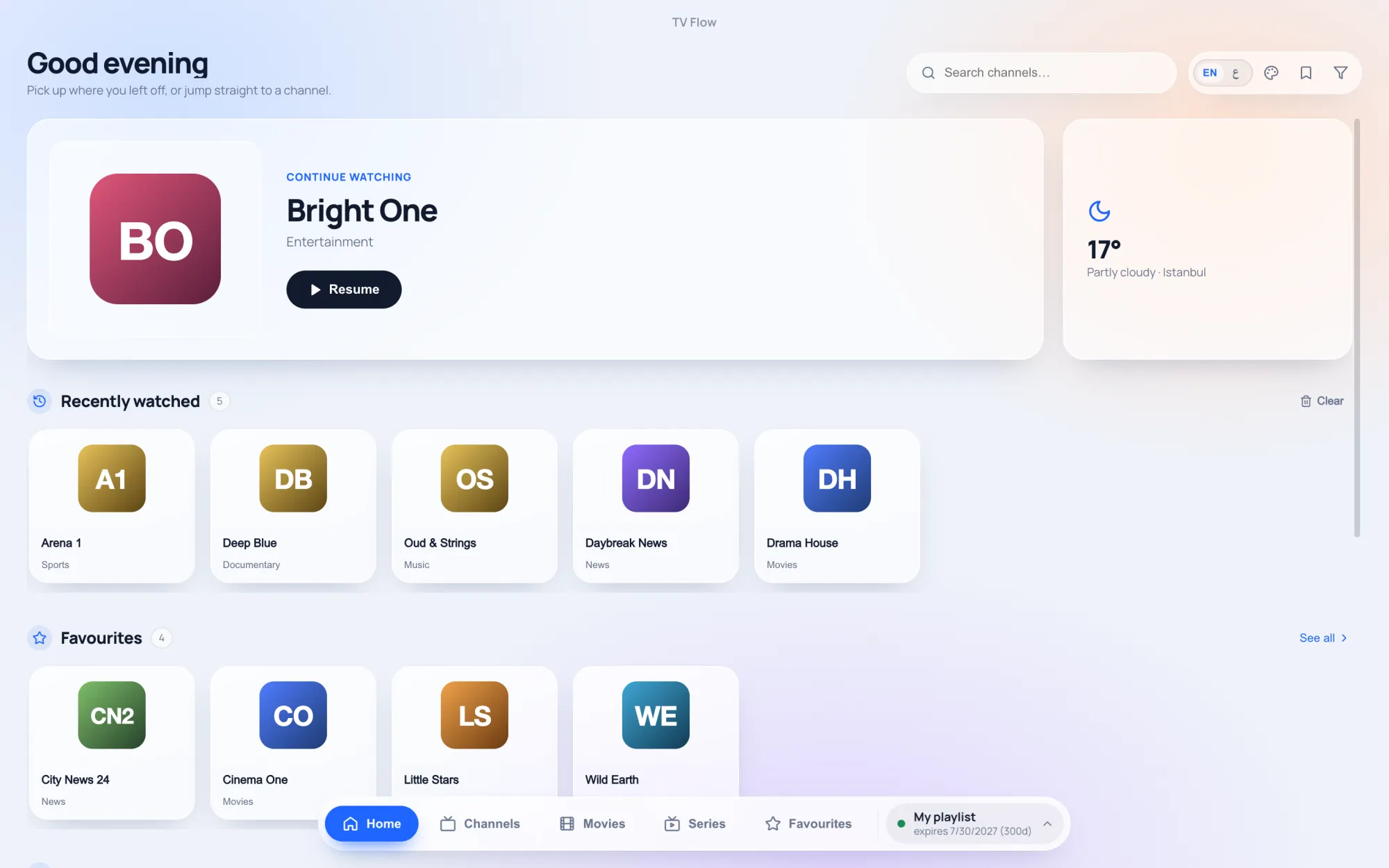
Our own. A desktop program for Mac (Intel and Apple silicon) and Windows 10/11 that opens an M3U link, an M3U file or an Xtream Codes login. Channels arrive in their groups with instant search, favourites and collections; films and series appear as a library with posters, ratings, seasons and episodes; the whole interface works in Arabic, right to left, or in English. It costs $19.99 once after a three-day free trial.
What it lacks: recording, catch-up, a full guide grid (it shows now and next), Stalker portals, and any phone or TV version.
IPTVnator
The best free choice. Open source, with releases every few weeks, for Mac, Windows and Linux. It reads M3U, Xtream and Stalker, has a guide grid and catch-up, and comes in nineteen languages. The usual complaint is streams that fail in its built-in player until you switch playback to an external one such as MPV or VLC. IPTVnator and TV Flow compared.
VLC
Already on your computer, probably. Open Network Stream, paste the M3U link, done. It shows the playlist as one flat list: no groups, no guide, no film library, no Xtream login. Perfect for a few dozen channels, tiring for a few thousand. How to use VLC for IPTV, and where it stops.
Kodi
A media centre rather than a player. With the official PVR IPTV Simple Client add-on it gives you a proper guide, catch-up and timeshift from an M3U playlist. Setup takes several steps, there is no Xtream login screen, and large playlists load slowly. At its best on a computer wired to a television. Kodi for IPTV: setup and limits.
MyIPTV Player
The long-standing Microsoft Store app, Windows only. Free with ads, with a yearly add-on to remove them. It has a guide, Xtream catch-up, film and series sections and downloads. No Mac version, no Arabic. MyIPTV Player compared.
Ipexo IPTV Player
A newer paid desktop player for Windows and Mac, with an iPhone version too. Yearly or lifetime licences ($29.99 lifetime on the App Store). English only. Ipexo and TV Flow compared.
IPTV Smarters Pro
The name most providers put in their instructions. It has Windows and Mac programs, downloaded from the maker’s own site rather than the stores, and includes catch-up. Take care to get the genuine one, because look-alikes are common. Smarters on a computer.
IPTVX
The most complete player in the Apple world, sold by subscription. On the Mac it needs Apple silicon, and there is no Windows version. IPTVX compared.
Popular players that do not run on a computer
These come up in every search, so it saves time to know: TiviMate, Televizo, XCIPTV and OTT Navigator are Android apps with no Windows or Mac version; on a computer they run only inside an emulator. iPlayTV is an Apple TV app. Perfect Player has had no release since 2021, and the Mac versions of GSE Smart IPTV and Flex IPTV were last updated in 2022.
How to choose
- Check what your provider gave you. A link works everywhere. A server, username and password is an Xtream login, which VLC and Kodi cannot use directly. A MAC address means a Stalker portal, which narrows the field to IPTVnator and, according to its website, Ipexo. (M3U and Xtream Codes explained.)
- Decide whether you need catch-up or recording. If yes, TV Flow is not for you yet.
- Try with your own playlist. Playback differs from provider to provider far more than reviews suggest. Every app here is free or has a trial.